Google Analytics & Meta Pixel Integration
QRTRAC's built-in analytics tracks scans. Connecting GA4 and Meta Pixel takes that data further — attributing offline QR traffic to campaigns inside the tools your team already uses, and building retargeting audiences from people who scanned physical print.
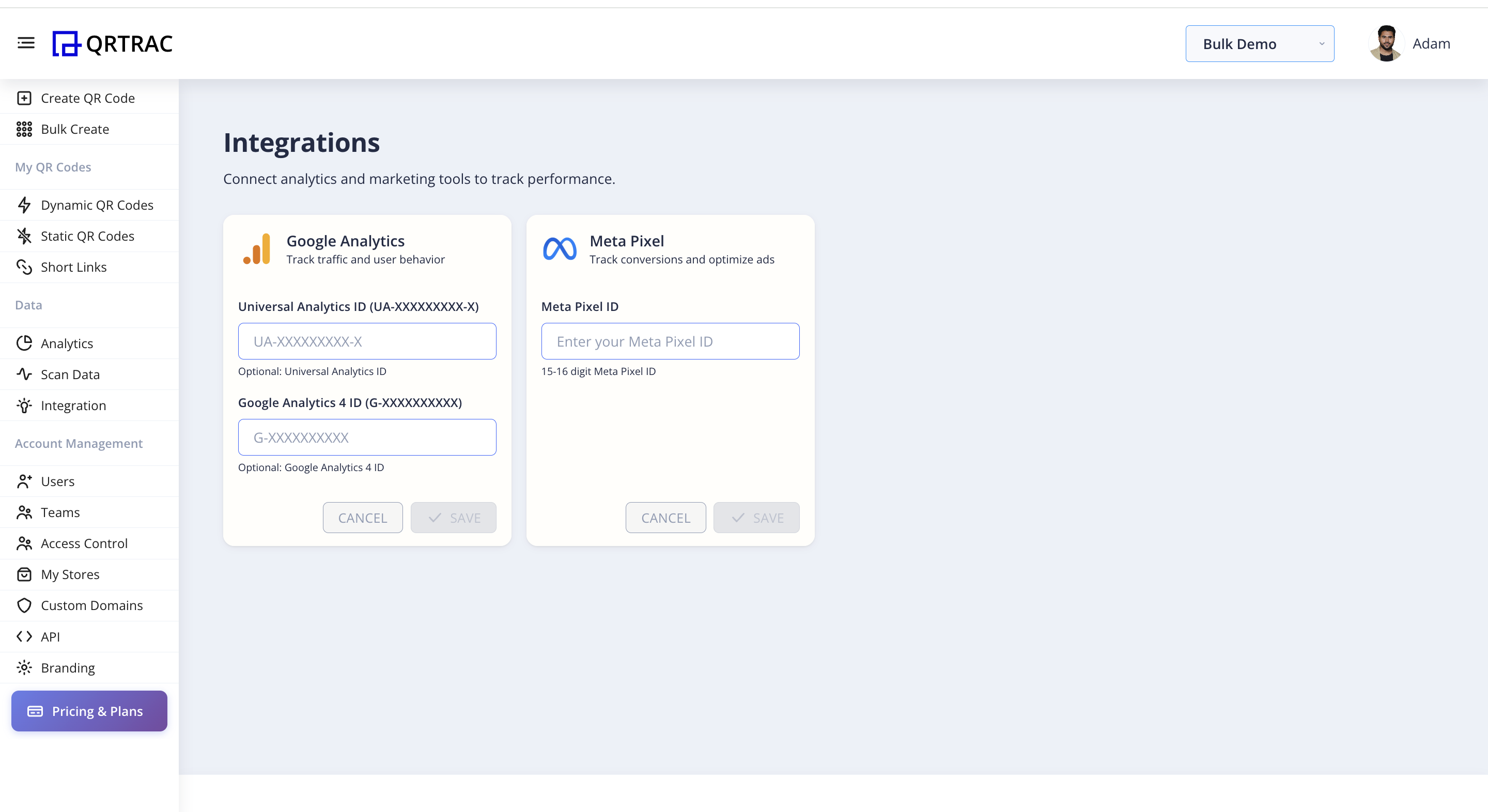
What each integration does
Google Analytics (GA4)
- Logs each scan as a
qr_scanevent in GA4 - Enables campaign attribution via UTM parameters
- Shows scan sessions in Acquisition reports
- Supports Universal Analytics (UA) and GA4 IDs simultaneously
Meta Pixel
- Fires
PageViewandQRScanevents on every scan - Adds scanners to a Custom Audience in Meta Ads
- Enables Facebook and Instagram retargeting from offline traffic
- Supports
ViewContentandLeadevents
How to Connect — Step by Step
Step 1: Open Integrations
- Log into your QRTRAC dashboard
- In the left sidebar, under Data, click Integration
- You will see two panels: Google Analytics and Meta Pixel
Step 2: Connect Google Analytics
The Google Analytics panel accepts two optional IDs — you can enter one or both:
| Field | Format | Use |
|---|---|---|
| Universal Analytics ID | UA-XXXXXXXXX-X | Legacy GA property (if still active) |
| Google Analytics 4 ID | G-XXXXXXXXXX | Current GA4 measurement ID |
To find your GA4 Measurement ID: open Google Analytics → Admin → Data Streams → your stream → Measurement ID. It begins with G-.
- Paste your ID(s) into the relevant field(s)
- Click Save
Step 3: Connect Meta Pixel
The Meta Pixel panel accepts a single 15–16 digit Pixel ID.
To find your Pixel ID: open Meta Ads Manager → Events Manager → your Pixel → Settings. The ID is a 15–16 digit number.
- Paste your Pixel ID into the Meta Pixel ID field
- Click Save
Account-level setting
These IDs apply to all QR codes in your account. Every scan across every code will fire events to the connected GA4 property and Meta Pixel — you do not need to configure this per QR code.
What Data Flows to GA4
Each QR scan is logged as a custom GA4 event with the following parameters:
| Parameter | Value |
|---|---|
| event_name | qr_scan |
| qr_id | Unique ID of the scanned QR code |
| qr_name | The name you gave the QR code |
| campaign | Campaign name (if set on the QR code) |
| source | qr_code |
| medium | offline |
| device_type | iOS / Android / Windows / Mac |
| country | Scanner's country |
| city | Scanner's city |
Inside GA4, go to Reports → Engagement → Events and filter for qr_scan to see all QR-driven sessions. Use Acquisition → Traffic acquisition and filter by medium: offline to separate QR traffic from digital channels.
Tip: In GA4 you can also build custom explorations using the qr_name parameter as a dimension — letting you compare scan volume per individual QR code directly inside Google Analytics.
What Data Flows to Meta Pixel
When a QR code is scanned, QRTRAC fires the following Pixel events before forwarding the scanner to the destination:
| Pixel Event | When It Fires | What It Enables |
|---|---|---|
| PageView | Every scan | Base Custom Audience of all scanners |
| ViewContent | Every scan | Retargeting for catalogue / product ads |
| QRScan (custom) | Every scan | Custom audience segmented to QR traffic only |
| Lead | Configurable per QR type | Conversion tracking for lead-gen campaigns |
This happens in milliseconds — the scanner experiences no visible delay. The Pixel fires on QRTRAC's redirect page before the browser navigates to your destination.
The Offline Attribution Loop
Connecting these integrations turns your physical print spend into a measurable, optimisable funnel:
Without Integration
No attribution. Budget decisions driven by intuition.
With Integration
Offline spend feeds digital performance and competes fairly for budget.
Scans are intent signals, not outcomes
ROI is created when a scan results in a session, the session triggers Pixel events, the user is retargeted, and a conversion happens later. GA4 tells you which placements drive engaged sessions. Meta Pixel builds the high-intent audience that lowers your cost per acquisition over time.
Real-World Use Cases
D2C Brand — Packaging QR
Scenario
QR printed on product box, links to product story or upsell page
GA4 Insight
Scans per SKU, buyer location, repeat scan rate
Meta Retargeting
Cross-sell ads, refill reminders, loyalty offers → Higher LTV
B2B / SaaS — Events & Conferences
Scenario
QR on booth banner, links to demo or case study
GA4 Insight
Scans per event, engagement time, industry interest
Meta Retargeting
LinkedIn / Meta demo ads, webinar invites → Measurable event ROI
Nonprofit / NGO — Fundraising
Scenario
QR on donation posters and leaflets, links to donation page
GA4 Insight
Which poster locations drive the most traffic
Meta Retargeting
Retarget visitors who didn't donate with impact stories → Lower drop-off
Restaurants & Cafes — Table QR
Scenario
QR on tables links to menu or daily specials
GA4 Insight
Peak scan hours, repeat customer patterns
Meta Retargeting
Weekend offers, loyalty discounts → Increased repeat visits
Frequently Asked Questions
Do I need both GA4 and Meta Pixel, or can I use just one?
Each works independently. Connect only what you use — if you don't run Meta ads, skip the Pixel. If you don't use GA4, leave those fields blank. Both are optional.
Will the scanner notice any delay?
No. Tracking scripts fire in milliseconds on QRTRAC's redirect page before the browser navigates to your destination. There is no perceptible delay for the person scanning.
Where do I see QR scan data inside GA4?
Go to Reports → Engagement → Events and look for the qr_scan event. You can also filter Acquisition → Traffic acquisition by medium: offline to isolate QR-driven sessions from digital traffic.
How do I build a Meta retargeting audience from QR scanners?
Once your Pixel is connected, open Meta Ads Manager → Audiences → Create Audience → Custom Audience → Website. Select the QRScan or PageView event and choose your date range. Meta will populate the audience automatically as scans occur.
Does connecting GA4 replace QRTRAC's own analytics?
No. QRTRAC's native analytics (scans, unique scanners, device breakdown, city data, top performers) continue to work independently. GA4 is an additional layer for teams that want QR data consolidated alongside their website and app traffic.