Setting Up a Custom Domain
A custom domain replaces the default QRTRAC short URL with your own branded subdomain — for example qr.yourbrand.com instead of qrcodes.qrtrac.com. This builds trust with scanners, improves brand consistency, and can increase scan rates. QRTRAC automatically provisions a free SSL certificate once your domain is verified.
Quick setup overview
- Go to Custom Domains and click + Connect New Custom Domain.
- Enter your subdomain host (e.g.
qr) and your main domain (e.g.yourdomain.com). - In your domain registrar, add an A record pointing your subdomain to
34.149.105.65. - QRTRAC detects the DNS entry and automatically provisions your SSL certificate.
Step 1: Open Custom Domains
Click Custom Domains in the left sidebar under Account Management. The page lists all custom domains connected to your account, each shown as a card with:
- DNS Entry table — shows the Host Name, record Type (A), and the IP address Data value
- Status badge — Active once fully verified, or Awaiting DNS Entry if the A record has not yet been detected
- Progress steps — DNS Entry → SSL Certificate → Provision → Done
Click + Connect New Custom Domain in the top-right corner to add a new domain.
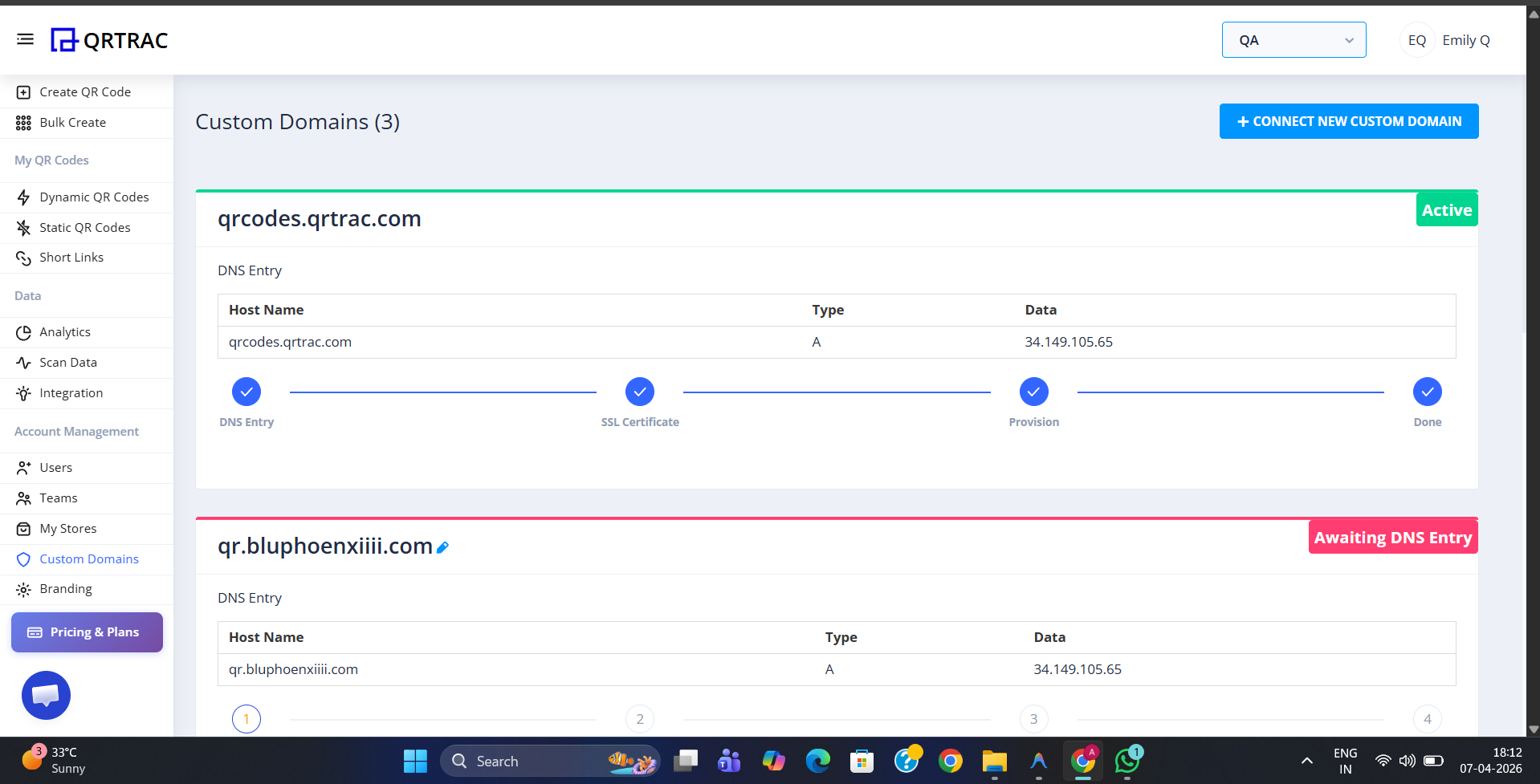
Custom Domains page — Active domains show all steps complete; Awaiting DNS Entry means the A record hasn't propagated yet
Step 2: Connect Your Domain in QRTRAC
The Connect Custom Domain form has two required fields:
- Host (subdomain alias) — the subdomain prefix only, alphanumeric characters (e.g.
qr,scan,vcard,page). This becomes the first part of your custom URL. - Domain (your main website URL) — your root domain without the subdomain (e.g.
yourdomain.com). Together with the host, this forms your full custom domain:qr.yourdomain.com.
Fill in both fields and click Connect. The domain will appear in your list with an Awaiting DNS Entry status until the A record is detected.
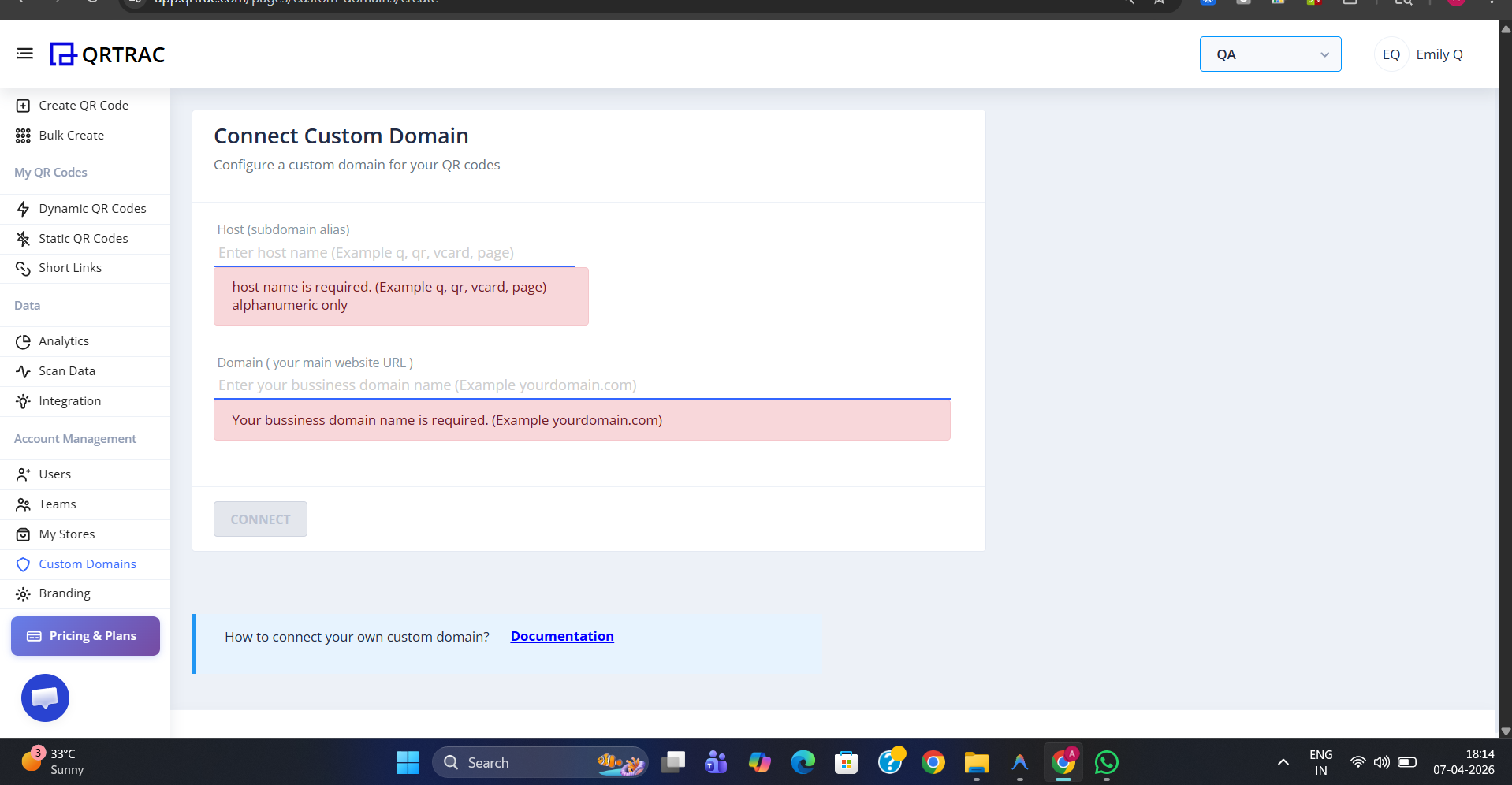
Enter your subdomain host and root domain — together they form your full custom domain URL
Step 3: Add an A Record in Your DNS Registrar
Log into your domain registrar (GoDaddy, Namecheap, Cloudflare, Google Domains, etc.) and navigate to the DNS Management section for your domain. Add a new A record with the following values:
| Type | Name / Host | Points To / Value | TTL |
|---|---|---|---|
| A | qr (your chosen subdomain) | 34.149.105.65 | Auto / 3600 |
Replace qr in the Name / Host field with whatever subdomain you entered in the QRTRAC form. Save the DNS record. Propagation typically takes between 15 minutes and 48 hours depending on your registrar and TTL settings.
Note: The exact steps for adding a DNS record vary between registrars. If you are unsure how to add an A record, refer to your registrar's support documentation or contact their support team.
Step 4: Verification & SSL Provisioning
Once the A record has propagated, QRTRAC automatically detects it and begins the verification process. The domain card on the Custom Domains page will progress through four stages:
- DNS Entry — A record detected successfully
- SSL Certificate — free SSL certificate automatically issued via Let's Encrypt
- Provision — domain being activated in the QRTRAC system
- Done — domain is fully active and ready to use
When all four steps are complete, the status badge changes to Active and your QR codes can begin using the custom domain.
Do not print QR codes until the domain is Active
DNS propagation can take up to 48 hours. Wait until the status shows Active and all four steps are complete before using the domain in printed materials or live campaigns.
Why Use a Custom Domain?
- Enhanced trust — scanners see your brand domain instead of a generic short link, reducing hesitation caused by phishing concerns
- Higher scan rates — a recognisable branded URL increases user follow-through
- Brand consistency — keeps the entire customer journey within your brand, with no QRTRAC branding visible to the scanner
- Better SEO — your domain gets the authority from QR code traffic rather than a third-party domain
- Free SSL — QRTRAC automatically provisions and renews the SSL certificate so all scans happen over secure HTTPS
Pricing: Custom domains are available on Business Plus and higher plans. Each additional domain costs $10/month, separate from your domain registrar fees. You can purchase additional domain slots from Account Settings.